いろいろと変わってた /wp-json/ 。
ブロックエディタはwp-jsonが使えることになっていることが前提らしく、wp-jsonを`index.php`に引数で渡さないと404エラーになってしまって、ブロックエディタが使えなくなってしまう。
    root /var/www/domain_www;
    index index.html index.php;

    location /wp-json/ {
        try_files $uri $uri/ /index.php?$args;
    }

    location / {
        try_files $uri $uri/ /index.php?$args =404;
}try_files行でindex.phpにrewrite先を記述する必要があるけど、通常の/にアクセスされた場合にwp-jsonも一緒に渡されるとダメ。
おおまかなイメージ的には……
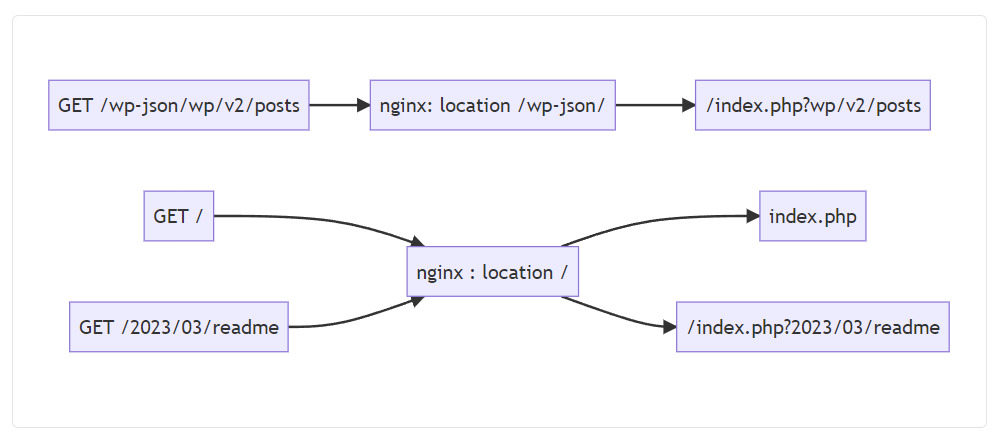
```
flowchart LR;

try_files_json["nginx: location /wp-json/"];
try_files_root["nginx : location /"];

get_json["GET /wp-json/wp/v2/posts"] --> try_files_json;
try_files_json--> index_json["/index.php?wp/v2/posts"];

get_index["GET /"] --> try_files_root;
try_files_root--> index_root["index.php"];

get_post["GET /2023/03/readme"] --> try_files_root;
try_files_root--> index_post["/index.php?2023/03/readme"];
```
たぶん、もっと正しいやり方があるかもしれないけど、ちゃんと動くようになった。
おおまかな図を書くためにWP Mermaid pluginをつかっているけど、再編集後に保存をすると図が壊れる。対応方法がわからないため、スクリーンショットで切り抜いて画像貼り付け。
flowchart LR;
try_files_json[“nginx: location /wp-json/”];
try_files_root[“nginx : location /”];
get_json[“GET /wp-json/wp/v2/posts”] –> try_files_json;
try_files_json–> index_json[“/index.php?wp/v2/posts”];
get_index[“GET /”] –> try_files_root;
try_files_root–> index_root[“index.php”];
get_post[“GET /2023/03/readme”] –> try_files_root;
try_files_root–> index_post[“/index.php?2023/03/readme”];
勝手にブロック内に追加される改行によってMermaid記法が認識できなくなるらしく…ちょっと面倒かもしれない。